


Voices AI: Voice Changer
4.51.58K Reviews
App Specs
- Version
- 1.16.5
- Updated On
- License
- Free
- Downloads
- 10,000,000+
- Developer
- Fiedler Tech LLC
- Categories
- Productivity
- Platform
- Android, iOS
Screenshots

 Analysis by AppCompare
I often want a quick way to make a voice clip sound different, but the usual options can turn a small joke or creative idea into a fiddly editing job. That is the problem Voices AI: Voice Changer is meant to make less of a hassle: record or bring in audio, experiment with a changed voice, then decide whether the result is worth saving or sharing. I see it as a playful audio tool rather than a replacement for a full editing studio, and that distinction matters if you want predictable, polished work.
In everyday use, the appeal is the short path from an idea to a listenable result. You can try a voice variation without first learning a complicated timeline editor or building a stack of effects by hand. That makes it handy when the goal is a quick reaction from a friend, a character voice for a rough draft, or a playful clip for a small project. The time saved is real only when you keep the task simple; for careful dialogue editing, another kind of app may be a better fit.
When a quick voice change solves the problem
A familiar example: I’m making a short birthday message for a group chat and want it to sound silly rather than like an ordinary voice note. I can record a line, try a different treatment, listen back, and keep the version that lands best. That is less effort than recording several elaborate takes or opening a general-purpose audio editor just to add a bit of character. It is also easy to abandon an idea if the effect makes the words hard to understand.
The same quick-turnaround approach can help while sketching a character for an animation, testing how a line might sound in a different register, or making a temporary guide track for a video. I would treat those as drafts, not assume that a playful effect is automatically suitable for a final production. A useful habit is to keep the original recording until you are happy with the changed version; that gives you a clean fallback if the processing makes a consonant muddy or a joke less clear.
It is less appropriate for work where a natural, consistent voice is essential. If you need precise control over every breath, edit points, background noise, and final loudness, a dedicated audio editor gives you more room to inspect and correct the result. Likewise, someone who wants a dependable voiceover workflow from recording through mixing may find a one-purpose voice changer too limited. I would use this for quick experiments and informal clips, then move to a fuller tool when the project depends on fine control.
A low-friction way to test ideas
The first useful setup is not elaborate: record a short, clear phrase, listen to it once in its original form, and then try an effect. Starting with a brief sample makes comparisons easier and avoids spending time processing a long take before you know whether the voice treatment suits it. I recommend using a sentence with varied sounds rather than a single sustained vowel; it gives you a better sense of whether the changed voice remains understandable in ordinary speech.
There is a trade-off between novelty and intelligibility. An exaggerated voice can be funny in a one-line message but tiring over a longer clip, while a subtler change may work better for narration or a character draft. I would test the result at the length people will actually hear it: a setting that sounds amusing for a few seconds may become distracting in a longer passage. This small check can save a round of re-recording and keeps the effect serving the message rather than taking it over.
Worth Reading Before You Choose

Flipboard Shows What News Apps Must Do Beyond the Feed

Switching to Android Auto Means Rethinking Your Driving Routine

Google Calendar Makes a Crowded Week Easier to Manage

Ludo King Makes the Most of the Minutes Between Plans

Baby Panda World Brings Quick Play to Modern Phones, but Its Game Library Feels Busy

ESPN’s Live Game View Makes Following Close Games Easier
It is also worth separating the creative choice from the delivery choice. First decide whether the altered voice works; then choose whether to save it or share it. If you are sending a clip to someone, listen to the saved or shared version rather than relying only on how it sounded while you were experimenting. That final check is a simple way to catch an unclear phrase or a result that does not match the mood you intended.
Getting Started with Voices AI
First things first, downloading the app is a breeze. Whether you’re on Android or iOS, just hit the app store, and you’re good to go. Once installed, the interface greets you with a sleek and user-friendly design that’s super intuitive. No need to read a manual or watch YouTube tutorials—everything is pretty much self-explanatory.
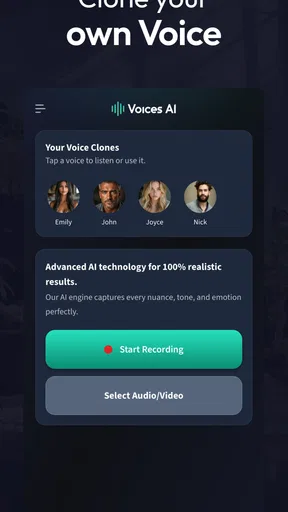
After launching Voices AI: Voice Changer, you’re immediately presented with a variety of options to record your voice or upload an existing audio file. It’s convenient, especially if you’ve got some pre-recorded material you want to play around with.
Exploring the Features
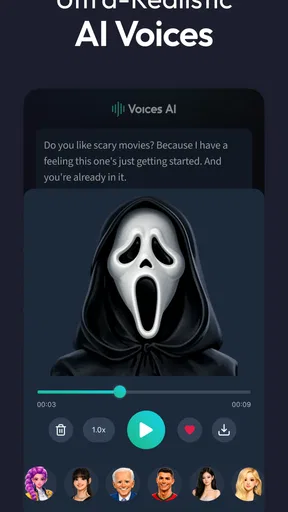
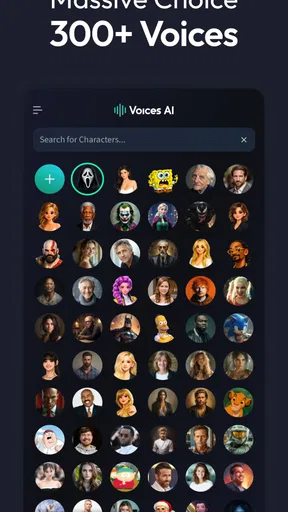
Now, here’s where the fun really begins. The app boasts a wide array of voice effects. You can transform your voice into that of a robot, a cartoon character, or even mimic your favorite celebrity. Seriously, the options are endless! What’s even cooler is that you can mix and match effects to create something uniquely yours.
One of my favorite features is the ability to change the pitch and speed of the recording. Whether you want to sound like you’ve inhaled a helium balloon or dropped your voice down to a baritone, the app makes it super easy to adjust these settings. It’s all about experimentation, and the app supports that with straightforward sliders that show real-time changes.
Practical Uses and Fun Times
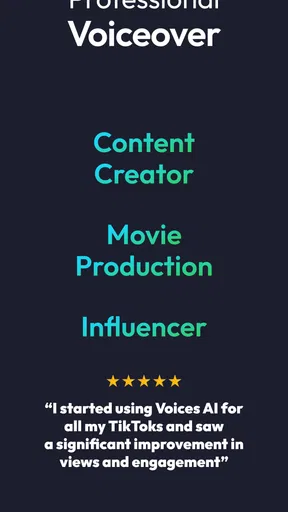
So, you might be wondering, what can you actually do with this app? Well, aside from pranking your friends and family, there are some practical uses as well. It’s perfect for content creators who need voiceovers for their projects. Whether you’re making YouTube videos, podcasts, or even animations, the voice modifying capabilities can add an extra layer of creativity.
But hey, it’s not all work and no play. I spent hours just playing around, sending hilarious voice messages to friends. It’s a great way to add a bit of humor to your day, and let’s be honest, who doesn’t need more laughter in their lives?
Sharing Your Creations
Once you’ve created your masterpiece, sharing it is as easy as pie. The app allows you to save your altered audio file directly to your device or share it via social media platforms and messaging apps. This makes it incredibly convenient to spread the fun and get instant feedback from your friends.
The developers have clearly thought about integrating social features seamlessly, making it a breeze to show off your creativity or just share a laugh.
What I’d keep in mind before using it
The practical question is whether this is a good fit for a particular kind of audio task. For a quick parody, a character sketch, or a joke between friends, a focused voice-changing app is more direct than a general recorder: you are there to alter a voice, not assemble a complete production. If you already edit video or audio and only need a small pitch adjustment, your existing editor may be more convenient because it keeps the voice alongside the rest of the project.
For creators, I’d use it early in the process rather than as the final step. Make a short test line, decide whether the effect adds something, and then record the full passage only if the experiment works. That avoids polishing a long take around a voice that later proves distracting. If the clip is intended for a podcast or a public video, I’d also listen for clear words and a consistent tone; a novelty effect can draw attention away from the actual message.
There is a social judgment involved, too. A transformed voice is best presented as a joke or creative effect, not used to make someone believe they are hearing a real person. Celebrity-style parody can be amusing, but I would keep the context obvious and avoid passing an altered recording off as genuine speech. That keeps the fun in the performance rather than turning it into a misleading message.
Who will get the most out of it
I think the strongest audience is people who make short, informal audio and enjoy trying different vocal characters without wanting to learn a full editing workflow. It can suit a family group chat, a playful birthday greeting, a rough animation track, or a creator testing whether a voice idea has comic timing. The option to start with an existing recording is useful when you already have a take you like and want to explore a different presentation without saying the whole thing again.
On the other hand, I would skip it if your main need is clean, natural speech, detailed noise repair, or precise multitrack production. Those jobs depend on controls and consistency beyond the central pleasure of changing a voice. I would also think twice if you only need a one-off effect and do not enjoy experimenting: the point is trying alternatives, and a simple built-in editor might be enough for a single routine adjustment.
As a productivity app, its value is quite specific. It does not organize tasks or manage a calendar; it saves effort in the narrow moment when you want to turn an ordinary spoken line into a more expressive one. That can be a genuine time-saver for a creator who repeatedly drafts character voices, but it is not a productivity boost for everyone. I would judge it by whether it removes a step from your own audio routine, not by how many effects you can browse.
How it fits among other audio tools
Compared with recording a new take in a different voice, the app gives you a faster way to explore a character without asking you to perform every variation yourself. Compared with a standard audio editor, it puts the voice transformation front and center, which is convenient for quick experiments but less suited to detailed mixing. A video editor may be the better choice if the audio must be timed precisely to footage, while a dedicated recording tool is preferable when clean capture and careful editing matter more than novelty.
That makes the choice less about which tool is universally best and more about where you want the work to happen. If the idea starts as a voice message and ends as a short sound gag, keeping the process focused is helpful. If it becomes part of a longer piece with music, narration, and scene changes, I would move the final assembly elsewhere. Treating the app as one step in a creative workflow gives it a clearer role and avoids expecting it to do everything.
Costs, expectations, and a sensible first try
The app is free to install, while optional in-app purchases range from under a dollar to nearly two hundred dollars per item. I would check the purchase details in the app before committing to anything, especially if I only want to make occasional clips. The free starting point makes it easy to see whether the basic experience suits you, but the range of possible purchase amounts is a reason to be deliberate rather than tap through a checkout casually.
It is rated for everyone and is made by Fiedler Tech LLC. It first appeared in August 2023, and version 1.15.10 is the current release. The app has an average rating of four and a half from around 119,000 ratings, with more than five million installs and roughly 1,400 written reviews. Those figures suggest that it has found a substantial audience, though popularity alone cannot tell you whether its style of effects matches your own taste.
For a fair first test, I would choose a quiet spot, record one short line, and try the same phrase with a couple of different treatments. That makes it easier to compare how each one handles your voice rather than confusing the result with a change in wording or delivery. Then save or share only the version you would genuinely use. If the experiment feels fun and quick, it is doing its job; if you are spending more time wrestling with the clip than enjoying the result, a different tool is likely the better choice.
Final Thoughts
So, is Voices AI: Voice Changer worth a try? Absolutely! Whether you’re looking to boost your content or just have a bit of fun, this app delivers on all fronts. It’s packed with features but remains easy to use, making it accessible to everyone, from tech newbies to seasoned pros.
Overall, this app is a delightful blend of technology and creativity. It’s not just about changing your voice; it’s about exploring new ways to express yourself and have a good laugh while doing it. Give it a whirl, and I’m sure you’ll be hooked just like I was!
Pros
- Wide range of voice effects
- User-friendly interface
- Real-time voice transformation
- High-quality audio output
- Regular updates with new features
Cons
- Limited free version features
- Requires stable internet connection
- Ads can be intrusive at times
- Some effects sound artificial
- Occasional app crashes
FAQs for Voices AI: Voice Changer
What features does Voices AI: Voice Changer offer?
Voices AI: Voice Changer provides a variety of features including real-time voice modulation, a library of pre-set voice effects, and customization options. Users can change their voice during calls, recordings, or for fun. The app also supports sharing altered voices on social media platforms, making it versatile for both entertainment and practical uses.
Is Voices AI: Voice Changer easy to use for beginners?
Yes, Voices AI: Voice Changer is designed with user-friendliness in mind. The interface is intuitive, allowing even beginners to navigate through its features effortlessly. The app provides step-by-step guides for setting up voice changes and applying effects, ensuring that users of all tech levels can enjoy its capabilities.
Does the app require an internet connection to function?
While some features of Voices AI: Voice Changer may require an internet connection, such as downloading new voice effects or sharing on social media, the core voice-changing functionalities can be accessed offline. This ensures that users can enjoy the app's main features without worrying about connectivity issues.
Are there any in-app purchases or subscriptions?
Voices AI: Voice Changer offers both free and premium versions. The free version includes basic voice effects, while the premium version, available via subscription, unlocks additional features and effects. Users should be aware of these options to decide if they want to invest in the enhanced capabilities offered by the premium version.
Is Voices AI: Voice Changer safe and secure to use?
Yes, Voices AI: Voice Changer prioritizes user privacy and security. It does not store or share personal voice data without consent. The app undergoes regular updates to enhance security features, ensuring a safe experience for users. Always download the app from official app stores to avoid security risks.


